How to Manage Corporate Event RSVPs Without Losing Track

To manage corporate event RSVPs, use one current attendee list, give each invitee a clear way to respond, set a deadline based on your supplier commitments, and track confirmed people separately from invitations. Keep the agenda, venue details and response link together so attendees can find the information they need before answering.
This guide is for HR teams, office managers and marketing teams organising company kickoffs, client events, seminars and business conferences. The goal is a dependable headcount and a manageable process, including when someone changes their plans.
On this page
Decide what an RSVP means for your event
An RSVP records a response to an invitation. It does not prove that someone attended. An open registration records a request or confirmation through a public sign-up process. Both can lead to the same event, but they need different rules.
For an internal kickoff, you may already know everyone invited. For a customer seminar, you may allow people to register through a shared event page. An invitation-only leadership dinner needs a clear guest policy; an open industry briefing needs a capacity limit and a way to handle excess demand.
Write down three decisions before building anything: who may attend, whether companions are allowed, and what happens when the event is full. If colleagues can forward an invitation, explain whether the recipient can use it or needs a separate registration.
Build one list with clear response statuses
Keep confirmed, declined, maybe, no response and waitlisted people distinguishable. A person who has not answered is not a confirmed attendee. Someone on a waitlist is not yet entitled to a place.
Use one operational source of truth, even if you also export spreadsheets for catering or badges. When a guest answers by phone, update that source immediately. Do not let the phone reply live only in a colleague's notebook.
InviApp's RSVP and guest list tools support personal response links, live status updates, companions, custom questions and manual status editing. Guests can respond without creating an account. That combination lets you accept a phone response without creating a second parallel list.
A useful minimum record includes the attendee's name, response status, approved companion count and the practical answers your team will act on. Assign one person to resolve duplicates and unclear responses.
If you are still choosing a tool, compare the workflows in RSVP spreadsheets versus event registration software before deciding where the live list will sit.
Count people rather than invitations
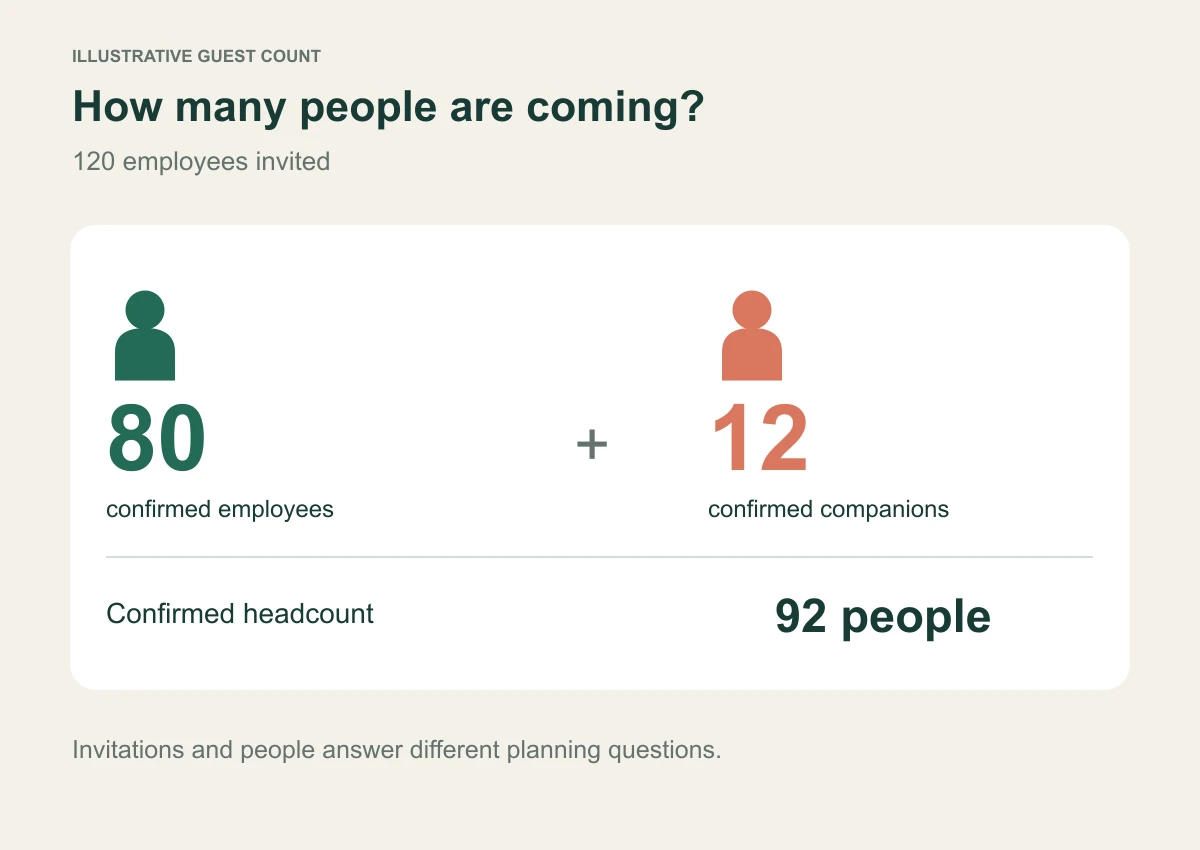
An illustrative example: 120 employees receive invitations. Eighty confirm, 20 decline and 20 have not replied. The 80 confirmed employees bring 12 approved companions.
The response rate is 100 divided by 120, or 83.3 percent, when a response means yes or no. The confirmed headcount is 92 people. Neither number is 120, and neither tells you how many people will arrive on the day.
Define whether a maybe counts as a response in your reporting, and apply that definition consistently. Keep unconfirmed companions out of a guaranteed catering total until their status is resolved.
InviApp includes confirmed companions in attendee totals. Before handing a list to a supplier, check the export rather than adding companions to a headline total that already includes them. Double counting is as disruptive as forgetting them.
Set the response deadline backwards from operations
Start with the earliest commitment that requires a stable number: a caterer's final count, a room layout, transport booking or security list. Leave enough time to correct unclear answers before that commitment.
For example, if catering numbers are due on Tuesday, a Monday evening RSVP deadline may leave too little time to resolve missing meal choices. A Friday deadline gives the organiser a working day to review the list. This is a planning example, not a universal timing rule.
Publish the deadline with a time zone when attendees are in different countries. Explain how to request a change after it passes. InviApp supports a response deadline that closes registration and changes automatically; check your event configuration before sending invitations.
Put the invitation and event details in one place
The invitation should answer the immediate decision: what the event is, why this person should come, when and where it takes place, and how to respond. The event page can carry the fuller programme, speaker information, directions and practical questions.
Use a stable page address in invitations and reminders. If a room changes, update the page and tell affected attendees; do not rely on people noticing a change without a message.
InviApp's business event platform brings registration, speaker profiles, agenda, partners and event details onto a branded page. The page can remain useful after the initial RSVP rather than becoming another link guests have to rediscover.
For a page-building checklist, see what to include on a corporate event page.
Ask questions that lead to an action
Every registration question should have an owner and a reason. Ask about transport if someone is booking transport. Ask about a workshop preference if that answer affects planning. Avoid collecting extra profile information simply because a form allows it.
Explain how attendees can request accessibility support and provide a contact route. The W3C checklist for accessible events recommends asking participants about their accessibility requirements. Collecting an answer is only the first step: a named organiser must arrange and confirm the support.
Keep individual dietary and support details out of general attendee communications. Share only the information each supplier needs through your organisation's approved process.
For sample wording, use the guide to corporate event registration questions. If capacity is limited, define the event waitlist process before invitations go out.
Send reminders according to response status
A non-responder needs a request to answer. A confirmed attendee needs arrival details. A waitlisted person needs a clear explanation of whether a place has become available. Treating those as one mailing creates avoidable confusion.
Before each reminder, refresh the recipient list. If automation is enabled, understand which statuses it includes and what happens after a response. InviApp offers automatic follow-ups for invitees who have not answered, alongside invitation and reminder tools.
Make it easy for a confirmed guest to report a cancellation. A cancellation received early enough can release a place and improve supplier numbers. See the RSVP reminder examples for status-specific wording.
Prepare the final handover
Create a dated snapshot for each operational recipient. Catering may need meal totals and essential dietary handling information. Reception may need names and an arrival list. The event lead needs a route for handling late changes.
InviApp supports XLSX and CSV attendee exports, with companions preserved. Treat each export as a snapshot: it becomes stale as soon as the live list changes. Put the export time in the filename and tell recipients which version replaces an earlier file.
After the event, reconcile actual arrivals separately if you collected them. Keep confirmed RSVPs, observed attendance and business outcomes as distinct measures.
Frequently asked questions
Do corporate event guests need an account to RSVP
That depends on the platform. InviApp lets invited guests respond through a personal link or a four-digit access code without creating an account. Test the full journey on a phone before distributing invitations.
Should we allow plus ones at a company event
Allow companions only when the event policy and capacity support them. State the allowance clearly, collect the required companion details, and include confirmed companions in venue and catering numbers.
What should we do when someone misses the deadline
Give them a named contact. Check space and supplier commitments before changing their status. A deadline should make planning reliable, while a controlled exception process lets the organiser handle genuine late changes.
Put the process into practice
Start with your next event's eligibility rules, supplier deadlines and minimum questions. Then explore InviApp Business to bring the event page and RSVP process together, and review current Business pricing for the plan that fits your team.