How to Manage an Event Waitlist Without Overbooking

An event waitlist records people who want to attend after confirmed capacity has been reached. To manage it reliably, define the available capacity, distinguish waiting from confirmed, release cancelled places through a clear process and tell people when they can still expect an offer. A waitlist entry is not a guaranteed place.
For business seminars, company workshops and customer briefings, the difficult part is keeping seat availability and communication aligned. This guide explains the decisions to make before enabling the feature.
On this page
Start with the real capacity
Confirm the operational limit with the venue and the people responsible for the event. A room's headline capacity may differ from the number that works with your seating layout, equipment and access arrangements.
Decide who counts against the limit. Attendees, approved companions and people with different operational roles may need separate treatment. Record reserved places for speakers, staff or invited groups so that a general registration total does not consume them accidentally.
An illustrative example: a seminar has 80 attendee places, with 10 reserved for invited partners. The general registration pool is 70 until the organiser decides whether any partner places can be released. Those 10 places are not available simply because the public list shows fewer than 80 registrations.
Keep waiting and confirmed statuses separate
A clear waitlist confirmation says that the person has joined the waiting list, does not yet have a confirmed place and will hear from the organiser if availability changes. Explain whether they need to take action now.
Do not send arrival messages that imply admission to everyone on the list. An attendee who reads “see you tomorrow” may reasonably conclude that they have been confirmed, even when the system still shows a waiting status.
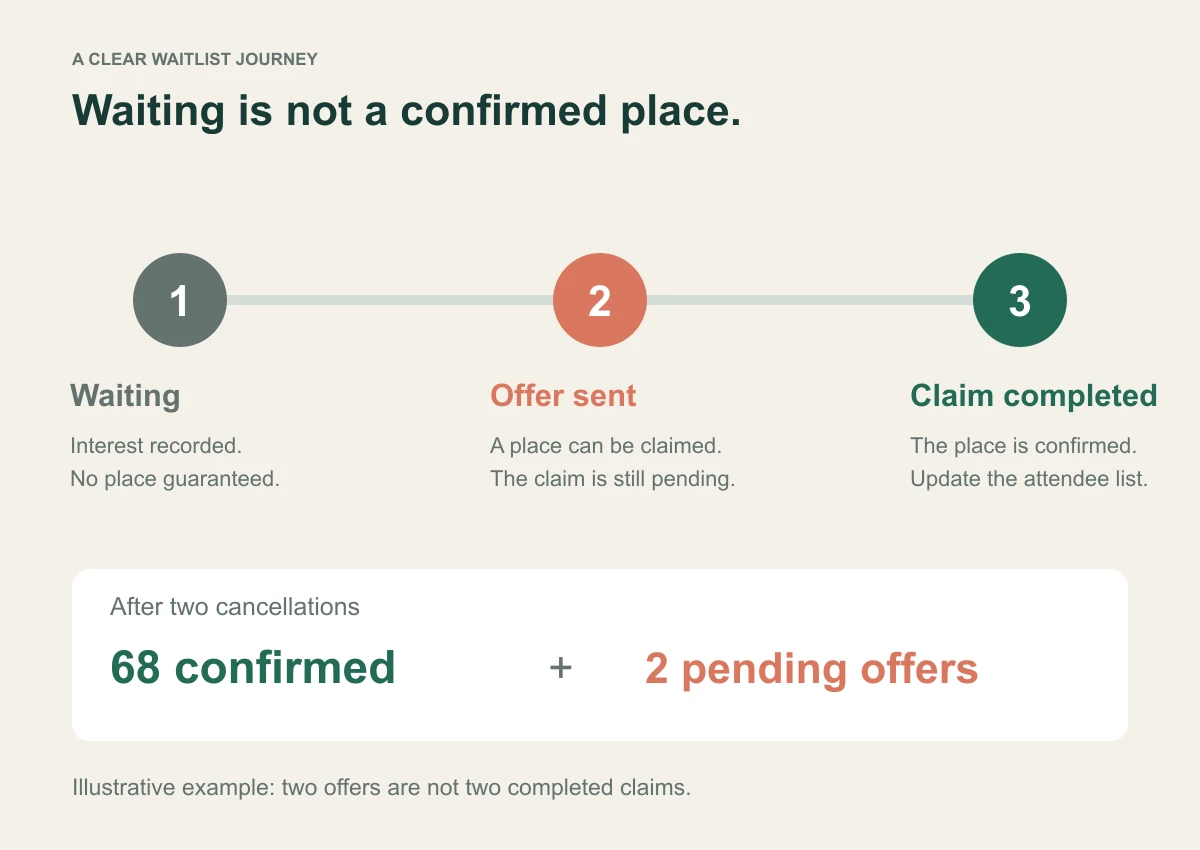
Use distinct language for three moments: joining the waitlist, receiving an offer and completing confirmation. Those are separate events. The operating process should make the transition visible to both the attendee and the organiser.
Publish a release policy
Explain how places are offered. A simple first-come process may suit a public seminar, while a member event may have eligibility rules. If reserved categories exist, document them rather than changing the order informally when someone influential asks.
Choose an operational cutoff for late offers. An attendee travelling from another country may be unable to use a place released on the morning of the event. A local briefing may tolerate much shorter notice.
If your workflow uses expiring offers, define the response window and what happens when it passes. Verify that the platform supports the rule you want. Do not assume that a waitlist feature includes configurable expiry, category priority or session-level inventory.
Make cancellation easy enough to use
A confirmed attendee who can no longer attend should know how to tell you. Include the cancellation or change route in confirmation and practical messages. After the response deadline, provide a monitored contact if self-service changes are closed.
Update the live list before offering the place to another person. A cancellation buried in an inbox does not become available capacity until the operational record is corrected.
Avoid automatically overbooking because some attendees might not appear. A waitlist gives you a way to respond to actual cancellations. Any overbooking decision requires a separate, deliberate assessment of venue constraints and the consequences if everyone arrives.
Use seat offers that require a clear response
InviApp's business registration features include a waitlist with claim links: when a seat becomes available, the next person is invited to claim it. This supports a distinction between offering a place and assuming someone still wants it.
Test the full journey before launch. Check what the recipient sees, how a claimed place appears in the attendee list, and how the event deadline affects the process. Check companion treatment when one invitation can cover more than one person.
Other platforms handle release rules differently. For example, Eventbrite's waitlist release documentation describes its own manual release process. Use the documentation for your chosen tool rather than transferring assumptions between products.
Original waitlist message examples
Joining the waitlist
“Thank you for your interest in [Event]. All currently available places are confirmed, so you have joined the waitlist. This is not yet a confirmed place. If availability changes before [cutoff], we will contact you with the next step. Questions: [contact].”
Offering an available place
“A place is now available for [Event] on [date]. Please use [claim link] to confirm that you still wish to attend. [Include a response deadline only if it is part of your actual process.] Your place is confirmed when [describe the confirmation outcome].”
Closing the waitlist
“Registration for [Event] is now closed, and we cannot offer further places. Thank you for your interest. [Include a future event or resource only if it genuinely exists and is appropriate to share.]”
Adapt these messages to the platform's actual behaviour. Do not promise a response deadline, position number or notification sequence that the software does not provide.
Reconcile availability before the final handover
Before sending the venue list, check confirmed attendees, companions, reserved places, unclaimed offers and waiting entries. The guide to corporate event registration metrics explains how to keep these populations distinct. Each has a different operational meaning.
A fictional example: 70 general places are confirmed, two people cancel and two offers are sent. Until the offers are claimed, report 68 confirmed and two pending offers. Do not report 70 confirmed just because you expect those offers to be accepted.
InviApp's RSVP and guest list tools support live attendee management and companion counts. Use exports as dated snapshots, and review any changes made after the snapshot before updating reception or catering.
Know when the waitlist needs a different solution
A long waiting list may indicate demand for another session, but it does not prove that all waiting people will attend a new date. Ask before booking more capacity.
If multiple workshops each have separate room limits, establish whether you need actual session booking. An event-level waiting list and a custom question about track preference are not automatically a session inventory system.
For the full process around invitations and deadlines, read how to manage corporate event RSVPs.
Frequently asked questions
Is joining a waitlist the same as registering for an event
It records interest in a place but should not imply confirmed attendance. Tell people clearly whether they are waiting, have received an offer or have completed confirmation.
Should we automatically confirm everyone when space opens
Use the process your platform supports and explain it in advance. A claim step can establish that the person still wants to attend before you treat the place as confirmed.
How late should a place be offered
Set a cutoff based on travel, venue and supplier needs. Communicate it to waiting people and provide a contact for exceptions. There is no single cutoff that suits every business event.
Test the waiting experience before you need it
Create a small test event, fill the capacity and follow a cancellation through to a claimed place. Explore InviApp Business for registration capacity, waitlists and attendee management on a branded event page.