RSVP Spreadsheet vs Event Registration Software for Business

Use an RSVP spreadsheet when the process is simple enough for one owner to keep accurate. Consider event registration software when responses arrive through multiple channels, guests change their plans, companions affect capacity or reminders consume substantial time. The important difference is how information reaches the list and stays current.
This comparison is for company events, business seminars and client gatherings. It does not assume that every event needs a platform or that software removes the need for an organiser.
On this page
A spreadsheet can be the right tool
For a small team lunch with one response channel and no complex arrangements, a sheet can be straightforward. It is flexible, familiar and easy to adapt for a one-off task. The owner can record names, answers and a total without configuring a broader event workflow.
The sheet needs clear statuses, consistent fields and a named owner. If one colleague writes “yes”, another uses “coming” and a third puts a number in the same column, the summary becomes harder to trust.
The challenge increases when the sheet is no longer where responses happen. Replies in email, chat and phone calls require someone to transfer each answer, interpret it and update later changes. That transfer is work, even when the spreadsheet formula is correct.
A form connected to a sheet is a middle option
A form can standardise the questions and reduce manual entry. Google's Forms documentation describes creating forms and managing responses. For a simple event, that may be enough when the team can handle the remaining operations.
Map those remaining operations explicitly: identifying repeat submissions, updating a changed answer, sending status-specific reminders, enforcing capacity and giving guests practical event information. Some needs may be covered by settings or other tools; others may remain manual.
Test the form using the account and sharing settings your organisation permits. Do not assume that every form can be completed without sign-in under every configuration.
Compare workflows rather than feature counts
| Task | Spreadsheet | Form with sheet | Registration platform |
|---|---|---|---|
| Collect first replies | An owner enters or imports answers. | Answers arrive in a standard structure. | The guest responds through a registration journey. |
| Handle changed answers | An owner reconciles the current answer. | Depends on edit settings and duplicate handling. | Check how recognised guests update their record. |
| Send status-based reminders | Filter records and prepare the messages. | May need extra settings, tools or manual work. | Check supported recipient rules and stop conditions. |
| Manage capacity and waiting | Requires an explicit manual process. | Depends on the form and any additional tools. | Verify capacity, companion and claim behaviour. |
| Provide event details | Share a separate page or document. | Often needs a separate programme page. | May combine the programme and response route. |
| Prepare supplier lists | Check the master sheet and export a snapshot. | Reconcile answers and export relevant fields. | Verify export fields and record the snapshot time. |
These are workflow questions, not universal feature promises. Settings, integrations and the specific platform can change what is automated.
A sheet stores records you enter or import. A registration platform connects the attendee's action to a live operational record and may also provide the event page, invitation links and reminders.
Evaluate the specific tasks your team performs:
- Collecting the first response and recognising the invitee.
- Handling a changed answer without losing the current status.
- Counting companions and collecting their practical details.
- Closing registration at a deadline or capacity limit.
- Sending the correct message to the correct response group.
- Producing a current handover for suppliers.
Ask vendors to demonstrate the journey that matters to your event. A list of features is less useful than watching a guest accept, add a companion, cancel and appear correctly in an export.
Work out the real administrative cost
Subscription cost is only one part of the decision. Estimate the time your existing process consumes, then compare it with the total cost and setup effort of an alternative.
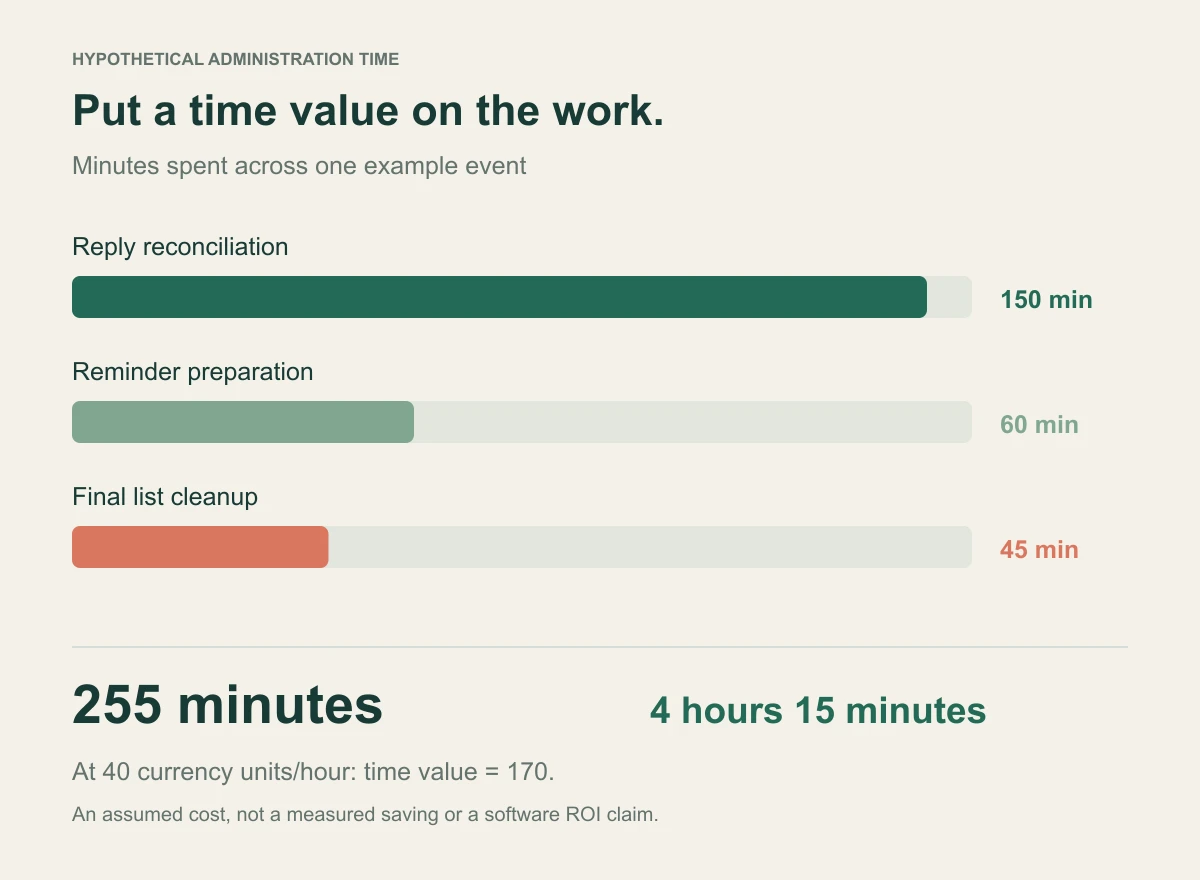
Here is an illustrative calculation, not a measured saving: an organiser spends 10 minutes per working day reconciling replies for 15 days, plus 60 minutes preparing reminders and 45 minutes cleaning the final list. That is 255 minutes, or 4 hours and 15 minutes.
At an assumed internal cost of 40 currency units per hour, the time value is 170. A platform is not automatically worth 170: some work will remain, and onboarding may add time. The example shows how to make the comparison using your own numbers rather than a vendor's universal savings claim.
Include message charges, training, brand setup and export preparation when applicable. Review current InviApp pricing rather than treating a blog article as a permanent price list.
Keep spreadsheets where they are useful
Moving registration to a platform does not mean abandoning spreadsheets. A sheet may still be the right place for budget planning, a catering summary or an internal analysis.
The key is to distinguish a live list from a snapshot. Once you export an attendee file, changes to the platform do not automatically update that file. Put a date and time in the filename and identify who must receive a revised version.
Avoid editing an old export as if it were the master list while another organiser continues updating the platform. Agree where corrections happen, then produce a new operational snapshot when needed.
Where InviApp fits
InviApp is relevant when your business event needs a branded page as well as responses. Its business platform combines invitations, registration, programme, speaker and partner information.
Its RSVP and guest list tools include personal links, companions, custom questions and live status management without requiring guest accounts. Capacity, a waitlist and a response deadline support open-registration events. Analytics and exports provide reporting and XLSX or CSV handovers.
Choose based on those demonstrated needs. If your event requires a specialist capability such as a CRM integration, complex ticketing, hotel inventory or session-by-session seat allocation, verify it directly before treating the platform as a complete replacement for existing tools.
For definitions to use during the pilot, see corporate event registration metrics.
A practical decision test
Keep the spreadsheet if one person can maintain it reliably, the response route is simple and the consequences of a late correction are manageable. Document the owner and the update rules.
Pilot software when you repeatedly chase missing answers, reconcile duplicates or struggle to maintain an accurate headcount. Choose a representative event, rather than the most complicated conference in your calendar.
During the pilot, record setup time, response handling, late changes, supplier export effort and attendee questions. Compare those observations with your existing process. A short pilot with real workflows tells you more than a broad claim that one tool is always best.
Move an existing list carefully
Clean duplicate records and define the meaning of every status before import. Check whether the import is creating invitees who still need to respond or confirmed attendees whose answers must be preserved.
Use a small test import first. Inspect names, contact fields, companions and question answers. Do not send invitations until you are satisfied that the mapping is correct and recipients should receive them.
Explain the new source of truth to your team. If guests continue to reply by phone, record those responses in the agreed system immediately. The corporate RSVP guide sets out the broader operating process.
Frequently asked questions
How many attendees make software worthwhile
There is no universal threshold. A smaller event with travel, companions and several organisers can require more coordination than a larger event with a simple response process. Evaluate the work and consequences, not just the headcount.
Can we still export to Excel
InviApp supports attendee exports in XLSX and CSV, including companion information. Check the actual fields in a sample export before relying on it for a supplier handover.
Does software eliminate manual administration
No. It can automate parts of collection and follow-up, but people still set rules, resolve exceptions, verify practical answers and maintain the event programme.
Compare one real event
List the tasks that currently take time, then test how each would work in the alternative. Explore InviApp Business if you need registration and a branded event page in the same workflow.