Corporate RSVP Reminder Email Templates and Sending Plan

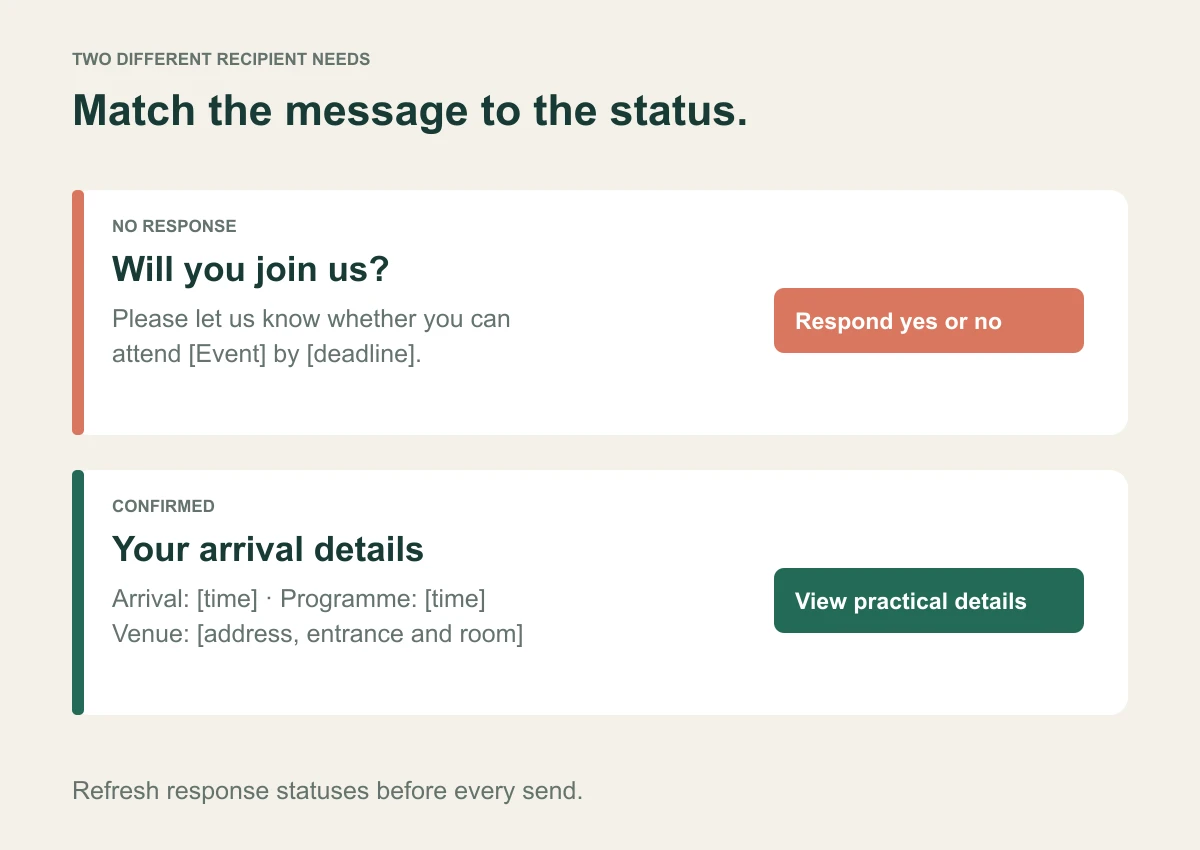
A corporate RSVP reminder should go to people who still need to respond, repeat the event and deadline, and provide a direct response link. Confirmed attendees need a different message with arrival information. Always refresh response statuses before sending so people are not asked to register again after they have answered.
The templates below are original examples for company events, client briefings and business conferences. The sending plan is a starting point to adapt to your event, not a claim that one schedule produces a particular response rate.
Download the reminder templates as plain text. No email address required.
On this page
Start with the decision each message supports
A reminder is useful when it helps the recipient do something specific. A first reminder helps an invitee make a decision. A deadline reminder explains when that decision is due. An arrival message helps a confirmed attendee turn up in the right place.
Create separate recipient groups for no response, confirmed, declined and waitlisted. A maybe may need its own follow-up if you require a firm answer. Do not describe a waitlisted person as confirmed.
Eventbrite's RSVP email guidance discusses consistent event details and tone across invitation messages. Apply that consistency while changing the action to match the recipient's status.
A practical reminder schedule
| Message | Recipient | Purpose |
|---|---|---|
| First RSVP reminder | No response | Ask for yes or no while there is time to decide. |
| Final deadline reminder | Still no response | State the real cutoff and operational reason. |
| Maybe follow-up | Maybe | Ask for a firm answer if final numbers require it. |
| Arrival reminder | Confirmed | Give time, entrance, room and contact details. |
| Waitlist update | Waitlisted | Explain whether a place is available; do not imply confirmation. |
Choose timing from your response window and supplier deadlines. Refresh statuses before sending; these are planning examples, not universal automation rules.
Plan backwards from the RSVP deadline and supplier commitments. For a business event with several weeks of lead time, a possible sequence is an initial invitation, a reminder midway through the response window, and a final reminder before the deadline. Allow enough time for someone to read and act on the final message.
For a small internal session announced a week ahead, that sequence may be excessive. For an international summit requiring travel, the first invitation and travel information need to arrive much earlier. Use your own history to choose timing and avoid copying benchmarks from unrelated events.
Stop RSVP reminders after someone answers. Send confirmed attendees practical updates only when they need them. If a room or start time changes, communicate that change directly rather than waiting for the next scheduled reminder.
First reminder for people who have not replied
Subject: Will you join us for [Event] on [date]?
Hi [First name],
A quick reminder about [Event] on [date], from [start time] to [end time], at [venue].
We will be discussing [specific topic or purpose], with [relevant speaker or session]. Please let us know whether you can attend by [deadline and time zone]: [personal RSVP link].
The event page includes the programme and practical details. If you cannot attend, selecting no through the link also helps us finalise the arrangements.
Questions: [organiser and contact].
[Sender name and team]
Use this when the invitation may have been overlooked. Keep the tone neutral. The recipient may have a legitimate scheduling conflict, and a decline is still useful information.
Final reminder before the response deadline
Subject: RSVP by [deadline] for [Event]
Hi [First name],
We are finalising arrangements for [Event] on [date]. Please confirm whether you can attend by [deadline, time and time zone]: [personal RSVP link].
Your response helps us confirm [catering, room layout or transport]. The programme and venue information are on the event page.
If you need help responding, contact [organiser]. After the deadline, please contact us directly about any changes so we can check availability.
Thank you,
[Sender name]
Name the real operational reason for the deadline. Avoid manufactured urgency, unsupported claims that places are disappearing, or a threat to exclude people when that is not the event policy.
Follow up on a maybe response
Subject: Can you confirm your plans for [Event]?
Hi [First name],
You previously marked [Event] on [date] as maybe. We now need to confirm the final numbers for [practical reason].
Please update your answer to yes or no by [deadline]: [personal RSVP link]. If your plans are still uncertain, contact [organiser] so we can explain the available options.
[Sender name]
This message acknowledges the earlier response. It is more accurate than telling the recipient they have not replied at all. Check how your platform treats maybe statuses before relying on an automated non-responder reminder.
Arrival reminder for confirmed attendees
Subject: Your arrival details for [Event] on [date]
Hi [First name],
We look forward to seeing you at [Event] on [date].
Arrival: [time and time zone].
Programme starts: [time].
Venue: [name, full address, entrance and room].
Event details and current agenda: [event page link].
Please [bring identification, use the named entrance or follow another genuine requirement]. For support on the day, contact [organiser and phone or email].
If your plans have changed, [explain the actual cancellation or change route]. Letting us know helps us keep the attendee list accurate.
[Sender name]
Keep essential arrival details in the message itself. A link is useful, but someone standing outside the venue should not have to navigate several pages to find the entrance.
Short SMS reminder
[Company]: Please RSVP for [Event], [date], by [deadline]: [personal link]. Questions: [contact].
For an arrival message, replace the RSVP request with the arrival time and location. Check the final message length after inserting names and links. Long URLs and nonstandard characters can affect how the message is divided and charged; verify the actual delivery and pricing behaviour with your provider.
Use channels approved for the event and your audience. Do not assume that an operational invitation gives permission for unrelated promotional messages.
Configure automation and test its boundaries
InviApp's invitations and reminders include automatic follow-ups for guests who have not answered and start-of-event SMS messages. Personal invitation links recognise the intended guest without requiring an account.
Before enabling messages for a live event, test a small set of records: confirmed, declined, no response and, if used, maybe or waitlisted. Check which messages each record should receive, whether links open the correct event, and whether the event's local time is correct.
The examples in this article are copy you can adapt. They do not imply that every timing rule or recipient condition is configurable in the platform. Check the available settings and manage any exceptions deliberately.
Measure replies rather than celebrating sends
A send count shows that a message was attempted, not that the recipient saw it or replied. After a reminder, review how many outstanding invitees responded and whether confirmed numbers changed.
If replies remain low, investigate the invitation's relevance, dates, eligibility and response journey. Sending more copies of an unclear invitation may not resolve the problem. The corporate RSVP management guide explains how to keep statuses and headcounts consistent.
Frequently asked questions
How many RSVP reminders should a company send
Use the smallest sequence that fits the response window and operational need. Two reminders may be reasonable for a longer planning window, while a short internal event may need only one. Review your own response history and audience feedback.
Should confirmed guests receive RSVP reminders
They should receive practical event updates, rather than another request to RSVP. Acknowledge their confirmed status and explain how to report a cancellation or change.
What should happen after the deadline
Stop automated requests to use a closed registration process. Give late responders a contact route, then check capacity and supplier commitments before confirming a place.
Make the next reminder useful
Choose the template that matches the recipient's status and test the response link. Explore InviApp Business to connect personal invitations, live responses and reminders to the same branded event page.